As of April 2026, this method has stopped working as Actalis have stopped issuing
ip6.arpacertificates.
In my last post, I showed how to get a free TLS certificate for .ip6.arpa domain with Cloudflare, which no longer works. However, I have found an new CA and this one is actually better since they’ll let you download the certificate.
The new method: Actalis
Actalis is an Italian CA that offers free 90 day certs via ACME, and they’ll issue them for .arpa domains.
This guide uses acme.sh and assumes Cloudflare as your DNS provider (though any ACME-compatible DNS provider works fine). You will need:
- A Cloudflare API token with
Zone:DNS:Editpermission for your zone - An Actalis account with EAB credentials (free, no card required)
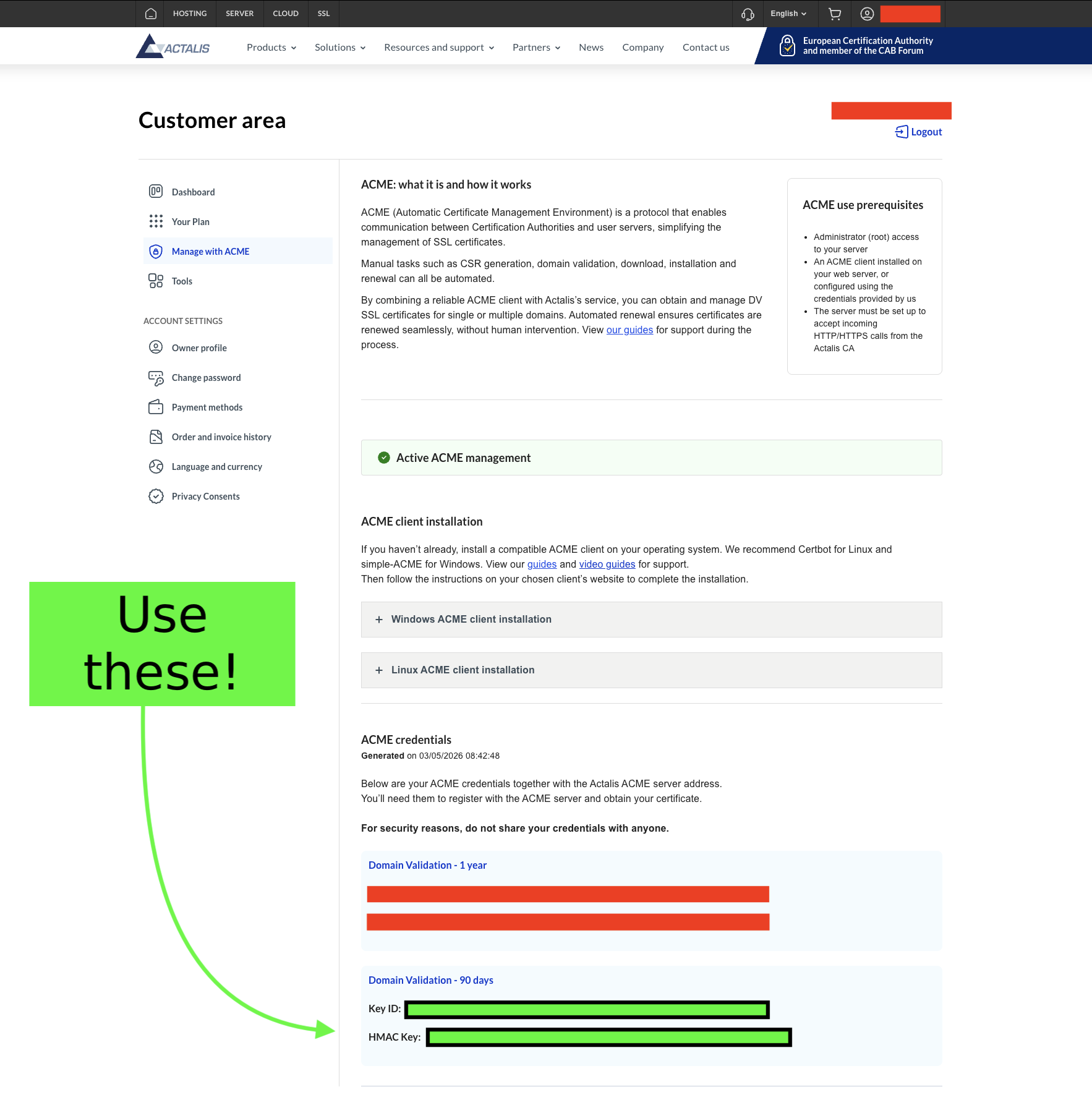
Register for a free account with Actalis (No card required). Once logged in, go to the ‘Manage with ACME’ page where you will find an EAB key pair - you’ll receive a Key ID (--eab-kid) and an HMAC key (--eab-hmac-key). It is important that you use the Domain Validation - 90 days key pair and not the year-long ones as you’re using the free tier.
Issuing the certificate
First, install acme.sh.
Run the following command to register your account using your Actalis EAB credentials:
acme.sh --register-account \
  --server https://acme-api.actalis.com/acme/directory \
  --eab-kid "YOUR_KEY_ID" \
  --eab-hmac-key "YOUR_HMAC_KEY" \
  -m you@example.com
If everything goes well, issue the certificate:
CF_Token="YOUR_CLOUDFLARE_API_TOKEN" \
acme.sh --issue \
  -d b.4.0.c.7.0.4.1.a.2.ip6.arpa \
  --dns dns_cf \
  --server https://acme-api.actalis.com/acme/directory
acme.sh will add a _acme-challenge TXT record to your Cloudflare zone, wait for propagation, complete the challenge, and hand you a signed certificate.
Now install the certificate (example with nginx):
acme.sh --install-cert \
  -d b.4.0.c.7.0.4.1.a.2.ip6.arpa \
  --key-file /etc/nginx/ssl/b.4.0.c.7.0.4.1.a.2.ip6.arpa.key \
  --fullchain-file /etc/nginx/ssl/b.4.0.c.7.0.4.1.a.2.ip6.arpa.crt \
  --reloadcmd "systemctl reload nginx"
The --reloadcmd is stored in the cert’s config and runs automatically after each renewal, so you only need to do this once.
acme.sh installs a cron job at install time that runs acme.sh --cron daily. Any certs are automatically renewed.